 Google can’t help but stay in the spotlight. Today’s latest: Google Picasa Web Albums. I quickly signed up for this “test” (rather than “beta” for some reason) product and gave it a test spin. Initial impression: yet another impressive, free tool from Google for online collaboration. Read on for features and screenshots:
First and foremost, it asks you to install the latest version of Picasa which supports web albums (or it updates your current version). Here’s a picture of the startup screen with a little graphic explaining the simple steps to upload images from your desktop once Picasa is installed (click to view full size):

Once Picasa is installed/updated on your computer, you simply select a folder and then click on the Web Album button in the bottom of the window to get this login screen from your desktop (click for full size):

Once logged in, you’ll get a screen asking you for an album title, description (optional), and upload settings (three to choose from, pictured):

There’s also an upgrade storage button, which takes you to this screen that explains details on how to sign up for six gigabytes (instead of the standard 250 megabytes) of storage for $25 a year (click image for full size):


Once the album is uploaded, you can view an overview shot of all the pictures (with three different picture sizes depending on how many you have in the album) with a description shown here (click for full size):

Here’s a shot of the account settings page where you can change your nickname, how others see and access your content, and your RSS feeds:


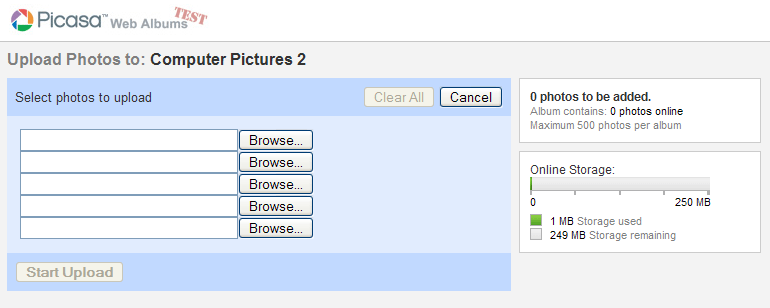
Alternatively, you can upload pictures from the web interface rather than from the desktop interface. Here’s what that screen looks like (click for full size):
Overall, it has the typical Google polish: Just enough flexibility to be very usable without undue complexity. The handy interface has easily accessible features such as slide show (web-based, really nicely done!), sort, rearrange, share (speaking of which, check out the screenshot below), etc. all there to help you share and manage your photos online. It won’t be long before we’ll forget we ever used email to share pictures.


Oh, and I almost forgot, click here to see the public pictures I uploaded through this review.
Use a real online photo sharing website and ‘it won’t be long before you’ll forget you ever used Google to share pictures.’
Sorry to be so harsh but this really is a pretty average offering by Google. 🙂
Maybe “average” in that Google has been releasing quality free products for a long time now (so compared to other Google projects). But compared to the rest of the online/free/web2.0/photo-sharing world? I think I’ve found what I’ll be using.
this is sub-par to flickr, et. al.
there’s not a way to send pics from my phone to picasa, if there was, then i’d switch from flickr. until then, it’s flikr.
I hope it isn’t like the ‘free’ Picasa 2 from Googles own website that installs spyware (picked up if you are running Stopzilla).
I’ve used ofoto, now Kodak Gallary, for about six years. They still have gigs and gigs of my pix from the begining till now, for free.
Oh yeah, I can share and ORDER PRINTs. Until there web portal has a way for my family and friends to order pix (for grandmas and such) I’ll still upload pix from Picassa desktop to Kodak Gallery.
This sounds like another Google fan boy review. This is a *completely* sad and unimpressive offering by Google. It is not even close in comparison to Flickr. Not even close.
Plus what is up with the 250 mb storage limit?! That is hilarious. You have to pay $25/yr to upgrade to an account with yet another limit (While Flickr (which is also $25/yr) and new Yahoo photos beta (which is free) have unlimited storage).
The UI is also weak compared to Flickr, Yahoo Photos beta or even their own Calendar’s cool ajax UI. This is embarassing, and I feel it may have been rushed into release after Yahoo Photo Beta’s release one week back.
I suppose it’s a preference thing, but Flickr, for me, had an ugly, obtrusive, and not-very-intuitive interface. Perhaps it’s great for the techie, but for the average user, I think Google is much more welcoming.
the program picasa itself has some new features built in as well. The first time you start up an updated version it has to create new, hi-res thumbs of all your images for its new interface- this can take quite a while, especially with raw and psd files.
Also if you go to ‘tools’ –> ‘experimental’ you’ll see ftp uploading, geotagging, searching by colour and searching for duplicates. Cool stuff. Now if they only included ‘smart albums’…
I just got an invitation without doing anything. WEIRD.
I open my gmail account on one tab in firefox and in another i open the link to picasa and i got a page to accept the picassa invitation
Flickr too has a limit of 20MB uploads per month for its basic, free version.
I think this UI is much better, i.e. nicer looking and easier to use, than Flickr. I’m a Flickr fan myself though, but when I show other people (regular, non-computer savvy people) my Flickr site they have initial problems with navigation, and never use the commenting and other features.
On a side note, I see the pictures in your Picasa Web Album are all jpg’s. Big mistake. Wondering why the screenshots are so ugly? They should look exactly like they do on the screen, but don’t.
Here’s a tip:
JPG is for photos, PNG is for everything else.
Any way i could get an invite? I’m at dbrans at gmail.
thanks
Derek,
Google doesn’t treat it like it did gmail. With Web Albums, you visit picasaweb.google.com, sign up with your gmail account, and wait for Google to respond (hopefully quickly).